
graf
5. 세그먼트 탐색 및 추출 본문
esp_tool로 확인했을 때 초반 0x570 바이트 정도가 유일한 세그먼트로 확인됐었다.
하지만 펌웨어 크기에 비해 코드 영역이 지나치게 작은 것 같다는 생각이 든다.
어쩌면 숨겨진 세그먼트들이 더 있을지도 모르겠다.
이번에 이것을 확인해보려고 한다.
1. entropy 분석
$ binwalk --entropy esp_backup.bin

DECIMAL       HEXADECIMAL     ENTROPY
--------------------------------------------------------------------------------
0             0x0             Falling entropy edge (0.755991)
76800         0x12C00         Falling entropy edge (0.841027)
78848         0x13400         Falling entropy edge (0.835615)
82944         0x14400         Falling entropy edge (0.834484)
84992         0x14C00         Falling entropy edge (0.841433)
87040         0x15400         Falling entropy edge (0.837862)
94208         0x17000         Falling entropy edge (0.842691)
102400        0x19000         Falling entropy edge (0.787727)
105472        0x19C00         Falling entropy edge (0.831579)
116736        0x1C800         Falling entropy edge (0.844040)
125952        0x1EC00         Falling entropy edge (0.825446)
145408        0x23800         Falling entropy edge (0.832239)
147456        0x24000         Falling entropy edge (0.815336)
159744        0x27000         Falling entropy edge (0.820172)
176128        0x2B000         Falling entropy edge (0.837528)
183296        0x2CC00         Falling entropy edge (0.843507)
188416        0x2E000         Falling entropy edge (0.812251)
198656        0x30800         Falling entropy edge (0.826703)
223232        0x36800         Falling entropy edge (0.807384)
243712        0x3B800         Falling entropy edge (0.842709)
247808        0x3C800         Falling entropy edge (0.833525)
260096        0x3F800         Falling entropy edge (0.849316)
266240        0x41000         Falling entropy edge (0.820558)
275456        0x43400         Falling entropy edge (0.846622)
277504        0x43C00         Falling entropy edge (0.845035)
282624        0x45000         Falling entropy edge (0.838331)
285696        0x45C00         Falling entropy edge (0.845505)
287744        0x46400         Falling entropy edge (0.777692)
292864        0x47800         Falling entropy edge (0.848379)
311296        0x4C000         Falling entropy edge (0.841544)
338944        0x52C00         Falling entropy edge (0.830071)
402432        0x62400         Falling entropy edge (0.683112)
410624        0x64400         Rising entropy edge (0.961373)
411648        0x64800         Falling entropy edge (0.717582)
438272        0x6B000         Falling entropy edge (0.778501)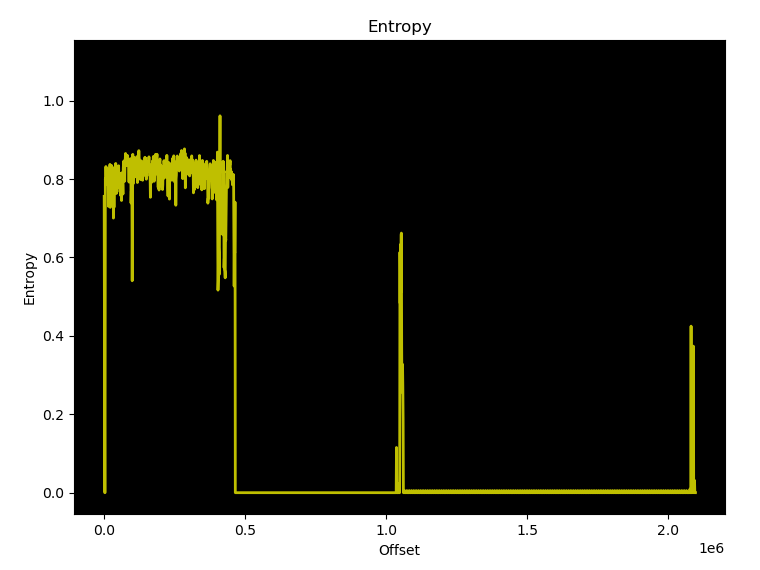
첫번째 세그먼트가 나오는 0x570 언저리를 한참 벗어나고도 엔트로피가 엄청나게 요동친다.
S-box랑 인증서가 나오는 곳이 0x622D2 부터였으니까
실행 가능한 코드 영역이 높은 확률로 더 존재한다는 말이다.
2. 이미지 헤더 확인
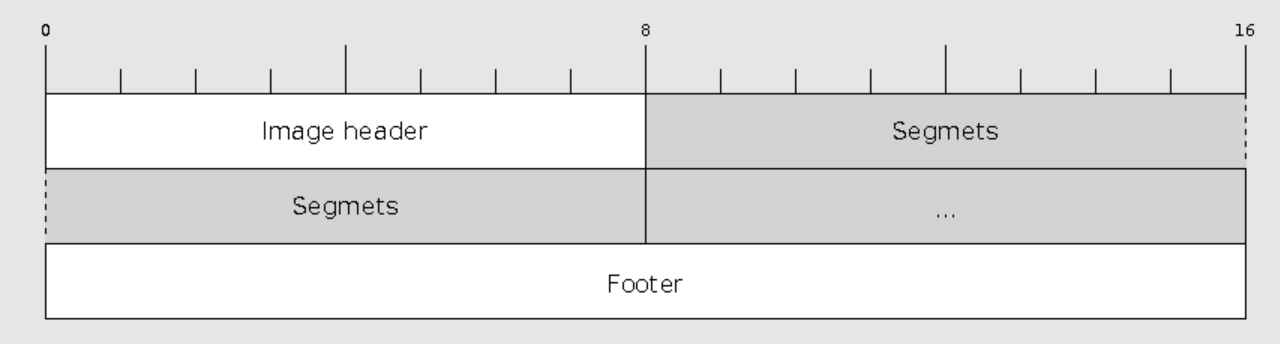
세그먼트를 직접 찾아보자.

00000000 e9 01 02 30 9c f2 10 40 00 f0 10 40 70 05 00 00 |...0...@...@p...|
펌웨어를 hexdump로 본 첫번째 라인이다.
두번째 바이트가 1이니 등록된 세그먼트가 하나라는 말이다.
하지만 정황상 더 많은 세그먼트들이 존재하는 것이 거의 확실하다.
알아보니 세그먼트를 찾지 못하게 난독화 목적으로 이렇게 만드는 경우도 있다고 한다.
이미지 헤더에서 세그먼트 정보를 없앴다면
분명 세그먼트를 직접 매핑하는 동작이 하드코딩돼있을거다.
그걸 한번 찾아보자.
2.1 세그먼트 로드 패턴 탐색1

이건 세그먼트 헤더 구조다.
처음 4바이트가 메모리에 로드되는 주소를 의미한다.
만약 세그먼트를 memcpy같은거로 직접 로드한다면
1로드할 주소, 2로드할 데이터, 3크기 까지 적어도 인자가 세개는 있을거다.
def find_l32r_call_patterns(filepath):
    with open(filepath) as f:
        lines = [line.strip() for line in f.readlines()]

    for i in range(len(lines) - 3):
        if all('l32r' in lines[i + j] for j in range(3)) and 'call' in lines[i + 3]:
            print("=== Found pattern at line", i + 1, "===")
            print("\n".join(lines[i:i + 4]))
            print()
find_l32r_call_patterns("disasm.txt")
로드 세번과 call이 오는 패턴을 찾아보자.
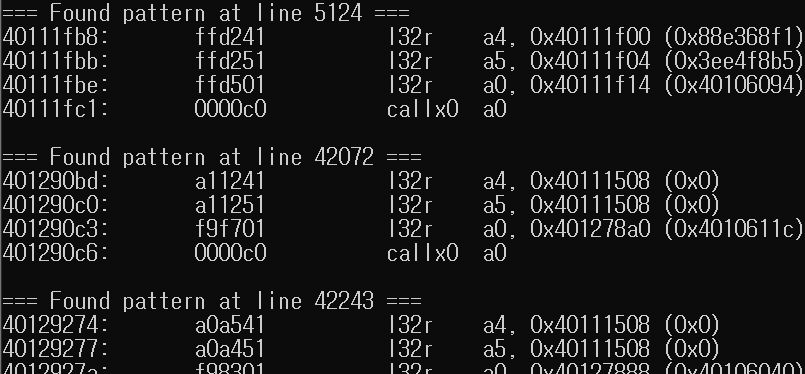
나오긴 하는데 양이 좀 많다.
xtensa의 calling convension대로면 인자 전달에는 a2부터 사용된다.
a4까지 로드하는 패턴만 간추려봐야겠다.
=== Found pattern at line 101305 ===
4014ef9b:       fc5431          l32r    a3, 0x4014e0ec (0x402629f0)
4014ef9e:       fece41          l32r    a4, 0x4014ead8 (0x9f9)
4014efa1:       fa8101          l32r    a0, 0x4014d9a8 (0x40100384)
4014efa4:       0000c0          callx0  a0

=== Found pattern at line 101328 ===
4014efd3:       fc4631          l32r    a3, 0x4014e0ec (0x402629f0)
4014efd6:       fec141          l32r    a4, 0x4014eadc (0xa00)
4014efd9:       f8f501          l32r    a0, 0x4014d3b0 (0x40100398)
4014efdc:       0000c0          callx0  a0

=== Found pattern at line 117846 ===
401598ec:       f9d531          l32r    a3, 0x40158040 (0x40263190)
401598ef:       ffc141          l32r    a4, 0x401597f4 (0x990)
401598f2:       ceaf01          l32r    a0, 0x4014d3b0 (0x40100398)
401598f5:       0000c0          callx0  a0

=== Found pattern at line 126171 ===
4015edf7:       fb6731          l32r    a3, 0x4015db94 (0x3ffe8eec)
4015edfa:       ffd041          l32r    a4, 0x4015ed3c (0xcef)
4015edfd:       f76b01          l32r    a0, 0x4015cbac (0x400024cc)
4015ee00:       0000c0          callx0  a0

=== Found pattern at line 131547 ===
401625d2:       fa0e31          l32r    a3, 0x40160e0c (0x3ffe8efc)
401625d5:       fff141          l32r    a4, 0x4016259c (0x82b)
401625d8:       e97501          l32r    a0, 0x4015cbac (0x400024cc)
401625db:       0000c0          callx0  a0

=== Found pattern at line 131566 ===
40162608:       fa0131          l32r    a3, 0x40160e0c (0x3ffe8efc)
4016260b:       ffe541          l32r    a4, 0x401625a0 (0x832)
4016260e:       e96701          l32r    a0, 0x4015cbac (0x400024cc)
40162611:       0000c0          callx0  a0

=== Found pattern at line 138109 ===
4016690b:       fa1d31          l32r    a3, 0x40165180 (0x402639e0)
4016690e:       ffd541          l32r    a4, 0x40166864 (0x817)
40166911:       9aa701          l32r    a0, 0x4014d3b0 (0x40100398)
40166914:       0000c0          callx0  a0

=== Found pattern at line 138329 ===
40166b31:       f99331          l32r    a3, 0x40165180 (0x402639e0)
40166b34:       ffd341          l32r    a4, 0x40166a80 (0x886)
40166b37:       9a1e01          l32r    a0, 0x4014d3b0 (0x40100398)
40166b3a:       0000c0          callx0  a0

=== Found pattern at line 138453 ===
40166c68:       f94631          l32r    a3, 0x40165180 (0x402639e0)
40166c6b:       fff541          l32r    a4, 0x40166c40 (0x8c7)
40166c6e:       1c7201          l32r    a0, 0x4012de38 (0x40100374)
40166c71:       0000c0          callx0  a0

=== Found pattern at line 138487 ===
40166cc3:       f92f31          l32r    a3, 0x40165180 (0x402639e0)
40166cc6:       ffdf41          l32r    a4, 0x40166c44 (0x8d3)
40166cc9:       99b901          l32r    a0, 0x4014d3b0 (0x40100398)
40166ccc:       0000c0          callx0  a0

=== Found pattern at line 138735 ===
40166f4b:       f88d31          l32r    a3, 0x40165180 (0x402639e0)
40166f4e:       ffcb41          l32r    a4, 0x40166e7c (0x936)
40166f51:       991701          l32r    a0, 0x4014d3b0 (0x40100398)
40166f54:       0000c0          callx0  a0

=== Found pattern at line 139206 ===
40167405:       f75e31          l32r    a3, 0x40165180 (0x402639e0)
40167408:       ffdc41          l32r    a4, 0x40167378 (0xa3e)
4016740b:       97e901          l32r    a0, 0x4014d3b0 (0x40100398)
4016740e:       0000c0          callx0  a0

=== Found pattern at line 139217 ===
40167420:       f75831          l32r    a3, 0x40165180 (0x402639e0)
40167423:       ffd641          l32r    a4, 0x4016737c (0xa31)
40167426:       97e201          l32r    a0, 0x4014d3b0 (0x40100398)
40167429:       0000c0          callx0  a0

=== Found pattern at line 139394 ===
401675f4:       f6e331          l32r    a3, 0x40165180 (0x402639e0)
401675f7:       ffdc41          l32r    a4, 0x40167568 (0xa77)
401675fa:       976d01          l32r    a0, 0x4014d3b0 (0x40100398)
401675fd:       0000c0          callx0  a0

=== Found pattern at line 139881 ===
40167afb:       f5a131          l32r    a3, 0x40165180 (0x402639e0)
40167afe:       ffbd41          l32r    a4, 0x401679f4 (0xbe0)
40167b01:       962b01          l32r    a0, 0x4014d3b0 (0x40100398)
40167b04:       0000c0          callx0  a0

=== Found pattern at line 140361 ===
40167fe6:       f46631          l32r    a3, 0x40165180 (0x402639e0)
40167fe9:       ffeb41          l32r    a4, 0x40167f98 (0xcd9)
40167fec:       966f01          l32r    a0, 0x4014d9a8 (0x40100384)
40167fef:       0000c0          callx0  a0

=== Found pattern at line 140849 ===
401684d1:       f32b31          l32r    a3, 0x40165180 (0x402639e0)
401684d4:       ffc141          l32r    a4, 0x401683d8 (0xe0c)
401684d7:       93b601          l32r    a0, 0x4014d3b0 (0x40100398)
401684da:       0000c0          callx0  a0

=== Found pattern at line 140860 ===
401684ec:       f32531          l32r    a3, 0x40165180 (0x402639e0)
401684ef:       ffbb41          l32r    a4, 0x401683dc (0xde1)
401684f2:       93af01          l32r    a0, 0x4014d3b0 (0x40100398)
401684f5:       0000c0          callx0  a0

=== Found pattern at line 141611 ===
40168cb2:       f13331          l32r    a3, 0x40165180 (0x402639e0)
40168cb5:       fff741          l32r    a4, 0x40168c94 (0x1052)
40168cb8:       91be01          l32r    a0, 0x4014d3b0 (0x40100398)
40168cbb:       0000c0          callx0  a0

=== Found pattern at line 167703 ===
40179abe:       fffa31          l32r    a3, 0x40179aa8 (0x3ffe8eec)
40179ac1:       fffa41          l32r    a4, 0x40179aac (0xa93)
40179ac4:       fffb01          l32r    a0, 0x40179ab0 (0x400024cc)
40179ac7:       0000c0          callx0  a0

=== Found pattern at line 168318 ===
4017a0f4:       fe6d31          l32r    a3, 0x40179aa8 (0x3ffe8eec)
4017a0f7:       ffe641          l32r    a4, 0x4017a090 (0xd07)
4017a0fa:       fe6d01          l32r    a0, 0x40179ab0 (0x400024cc)
4017a0fd:       0000c0          callx0  a0

=== Found pattern at line 170653 ===
4017b974:       fcb531          l32r    a3, 0x4017ac48 (0x3ffe8ef4)
4017b977:       ffc741          l32r    a4, 0x4017b894 (0x823)
4017b97a:       f84d01          l32r    a0, 0x40179ab0 (0x400024cc)
4017b97d:       0000c0          callx0  a0

=== Found pattern at line 170807 ===
4017bb12:       fc4d31          l32r    a3, 0x4017ac48 (0x3ffe8ef4)
4017bb15:       ffb441          l32r    a4, 0x4017b9e8 (0x8f7)
4017bb18:       f7e601          l32r    a0, 0x40179ab0 (0x400024cc)
4017bb1b:       0000c0          callx0  a0
간추린건데도 양이 적지 않다.
4015edf4:   fb6721          l32r    a2, 0x4015db90 (0x3ffe8ee0)
4015edf7:   fb6731          l32r    a3, 0x4015db94 (0x3ffe8eec)
4015edfa:   ffd041          l32r    a4, 0x4015ed3c (0xcef)
4015edfd:   f76b01          l32r    a0, 0x4015cbac (0x400024cc)
4015ee00:   0000c0          callx0  a0

401625cf:   fa0e21          l32r    a2, 0x40160e08 (0x3ffe8ee0)
401625d2:   fa0e31          l32r    a3, 0x40160e0c (0x3ffe8efc)
401625d5:   fff141          l32r    a4, 0x4016259c (0x82b)
401625d8:   e97501          l32r    a0, 0x4015cbac (0x400024cc)

40162605:   fa0021          l32r    a2, 0x40160e08 (0x3ffe8ee0)
40162608:   fa0131          l32r    a3, 0x40160e0c (0x3ffe8efc)
4016260b:   ffe541          l32r    a4, 0x401625a0 (0x832)
4016260e:   e96701          l32r    a0, 0x4015cbac (0x400024cc)
40162611:   0000c0          callx0  a0

4017a0f1:   fe6c21          l32r    a2, 0x40179aa4 (0x3ffe8ee0)
4017a0f4:   fe6d31          l32r    a3, 0x40179aa8 (0x3ffe8eec)
4017a0f7:   ffe641          l32r    a4, 0x4017a090 (0xd07)
4017a0fa:   fe6d01          l32r    a0, 0x40179ab0 (0x400024cc)
4017a0fd:   0000c0          callx0  a0

4017b971:   fcb421          l32r    a2, 0x4017ac44 (0x3ffe8ee0)
4017b974:   fcb531          l32r    a3, 0x4017ac48 (0x3ffe8ef4)
4017b977:   ffc741          l32r    a4, 0x4017b894 (0x823)
4017b97a:   f84d01          l32r    a0, 0x40179ab0 (0x400024cc)
4017b97d:   0000c0          callx0  a0

4017bb0f:   fc4d21          l32r    a2, 0x4017ac44 (0x3ffe8ee0)
4017bb12:   fc4d31          l32r    a3, 0x4017ac48 (0x3ffe8ef4)
4017bb15:   ffb441          l32r    a4, 0x4017b9e8 (0x8f7)
4017bb18:   f7e601          l32r    a0, 0x40179ab0 (0x400024cc)
4017bb1b:   0000c0          callx0  a0
해석에 문제가 있는 것으로 보이는 패턴이 가까이 있는 경우를 제외하고
a2 레지스터도 사용되었고, 상수를 로드하는 패턴을 골랐다.
여섯가지가 나왔는데 모두 공통적으로 0x400024cc 주소를 call한다.
세그먼트를 로드하기 위한 memcpy 함수로 추정된다.
근데 a2와 a3를 보면 인자로 전달하는 주소의 간격이 너무 가깝다.
0x400024cc 코드를 확인해보고싶은데 어느 위치인지를 찾아보자.
2.2 memory layout 확인
esp8266의 메모리 레이아웃이다.

0x40000000 영역이면 rom이다.
소스를 확인하기는 힘들겠다.

6개의 경우 모두 a2와 a3에 인자로 들어가는 주소가 ram이다.
플래시 주소가 아니니 펌웨어에서 세그먼트를 로드하는 동작은 이 중에 없다고 봐야겠다.


플래시 메모리를 로드하거나 플래시 메모리의 캐시로 사용되는 영역은 이렇게 된다.
0x400024cc를 호출하면서 저기 속한 주소를 인자로 보내는 곳을 반대로 찾아가보자.
$ cat disasm.txt | grep "0x400024cc"
4010f09a:       ffde01          l32r    a0, 0x4010f014 (0x400024cc)
4011bbf6:       cd0761          l32r    a6, 0x4010f014 (0x400024cc)
4011c5f4:       fffd01          l32r    a0, 0x4011c5e8 (0x400024cc)
4015cbd3:       fff601          l32r    a0, 0x4015cbac (0x400024cc)
4015cc69:       ffd001          l32r    a0, 0x4015cbac (0x400024cc)
4015cd94:       ff8601          l32r    a0, 0x4015cbac (0x400024cc)
4015cdd2:       ff7601          l32r    a0, 0x4015cbac (0x400024cc)
4015ce2d:       ff5f01          l32r    a0, 0x4015cbac (0x400024cc)
4015cee4:       ff3201          l32r    a0, 0x4015cbac (0x400024cc)
4015cff3:       feee01          l32r    a0, 0x4015cbac (0x400024cc)
4015d107:       fea901          l32r    a0, 0x4015cbac (0x400024cc)
4015d16c:       fe9001          l32r    a0, 0x4015cbac (0x400024cc)
4015d183:       fe8a01          l32r    a0, 0x4015cbac (0x400024cc)
4015d3a6:       fe0101          l32r    a0, 0x4015cbac (0x400024cc)
4015d3bd:       fdfb01          l32r    a0, 0x4015cbac (0x400024cc)
4015dbe0:       fbf301          l32r    a0, 0x4015cbac (0x400024cc)
4015edfd:       f76b01          l32r    a0, 0x4015cbac (0x400024cc)
40160e29:       ef6001          l32r    a0, 0x4015cbac (0x400024cc)
40160ff5:       eeed01          l32r    a0, 0x4015cbac (0x400024cc)
4016122f:       ee5f01          l32r    a0, 0x4015cbac (0x400024cc)
401612f5:       ee2d01          l32r    a0, 0x4015cbac (0x400024cc)
401617af:       ecff01          l32r    a0, 0x4015cbac (0x400024cc)
401617ff:       eceb01          l32r    a0, 0x4015cbac (0x400024cc)
40161b3e:       ec1b01          l32r    a0, 0x4015cbac (0x400024cc)
40161bb8:       ebfd01          l32r    a0, 0x4015cbac (0x400024cc)
40161d2c:       eba001          l32r    a0, 0x4015cbac (0x400024cc)
40161ddc:       eb7401          l32r    a0, 0x4015cbac (0x400024cc)
40161dee:       eb6f01          l32r    a0, 0x4015cbac (0x400024cc)
4016207a:       eacc01          l32r    a0, 0x4015cbac (0x400024cc)
401620cb:       eab801          l32r    a0, 0x4015cbac (0x400024cc)
401620f4:       eaae01          l32r    a0, 0x4015cbac (0x400024cc)
401623f4:       e9ee01          l32r    a0, 0x4015cbac (0x400024cc)
401625d8:       e97501          l32r    a0, 0x4015cbac (0x400024cc)
4016260e:       e96701          l32r    a0, 0x4015cbac (0x400024cc)
401636a2:       e54201          l32r    a0, 0x4015cbac (0x400024cc)
40164c27:       dfe101          l32r    a0, 0x4015cbac (0x400024cc)
40179ac4:       fffb01          l32r    a0, 0x40179ab0 (0x400024cc)
4017a0fa:       fe6d01          l32r    a0, 0x40179ab0 (0x400024cc)
4017ac92:       fb8701          l32r    a0, 0x40179ab0 (0x400024cc)
4017ad8d:       fb4801          l32r    a0, 0x40179ab0 (0x400024cc)
4017afcd:       fab801          l32r    a0, 0x40179ab0 (0x400024cc)
4017b045:       fa9a01          l32r    a0, 0x40179ab0 (0x400024cc)
4017b05e:       fa9401          l32r    a0, 0x40179ab0 (0x400024cc)
4017b07e:       fa8c01          l32r    a0, 0x40179ab0 (0x400024cc)
4017b10c:       fa6901          l32r    a0, 0x40179ab0 (0x400024cc)
4017b12c:       fa6101          l32r    a0, 0x40179ab0 (0x400024cc)
4017b1a4:       fa4301          l32r    a0, 0x40179ab0 (0x400024cc)
4017b1f9:       fa2d01          l32r    a0, 0x40179ab0 (0x400024cc)
4017b20f:       fa2801          l32r    a0, 0x40179ab0 (0x400024cc)
4017b541:       f95b01          l32r    a0, 0x40179ab0 (0x400024cc)
4017b683:       f90b01          l32r    a0, 0x40179ab0 (0x400024cc)
4017b829:       f8a101          l32r    a0, 0x40179ab0 (0x400024cc)
4017b97a:       f84d01          l32r    a0, 0x40179ab0 (0x400024cc)
4017bb18:       f7e601          l32r    a0, 0x40179ab0 (0x400024cc)
4017bd13:       f76701          l32r    a0, 0x40179ab0 (0x400024cc)
4017bd4f:       f75801          l32r    a0, 0x40179ab0 (0x400024cc)
4017bdee:       f73001          l32r    a0, 0x40179ab0 (0x400024cc)
4017c18d:       f64801          l32r    a0, 0x40179ab0 (0x400024cc)
4017c1bf:       f63c01          l32r    a0, 0x40179ab0 (0x400024cc)
4017c20b:       f62901          l32r    a0, 0x40179ab0 (0x400024cc)
4017c22a:       f62101          l32r    a0, 0x40179ab0 (0x400024cc)
4017c247:       f61a01          l32r    a0, 0x40179ab0 (0x400024cc)
4017c32f:       f5e001          l32r    a0, 0x40179ab0 (0x400024cc)
4017c34b:       f5d901          l32r    a0, 0x40179ab0 (0x400024cc)
4017c36c:       f5d101          l32r    a0, 0x40179ab0 (0x400024cc)
4017c4c2:       f57b01          l32r    a0, 0x40179ab0 (0x400024cc)
4017c647:       f51a01          l32r    a0, 0x40179ab0 (0x400024cc)
4017c65f:       f51401          l32r    a0, 0x40179ab0 (0x400024cc)
4017c6c3:       f4fb01          l32r    a0, 0x40179ab0 (0x400024cc)
4017c6e0:       f4f401          l32r    a0, 0x40179ab0 (0x400024cc)
4017c6f2:       f4ef01          l32r    a0, 0x40179ab0 (0x400024cc)
4017c722:       f4e301          l32r    a0, 0x40179ab0 (0x400024cc)
4017c7ef:       f4b001          l32r    a0, 0x40179ab0 (0x400024cc)
4017cb4d:       f3d801          l32r    a0, 0x40179ab0 (0x400024cc)
4017cb72:       f3cf01          l32r    a0, 0x40179ab0 (0x400024cc)
4017cbf4:       f3af01          l32r    a0, 0x40179ab0 (0x400024cc)
4017cc8e:       f38801          l32r    a0, 0x40179ab0 (0x400024cc)
4017cd27:       f36201          l32r    a0, 0x40179ab0 (0x400024cc)
4017cead:       f30001          l32r    a0, 0x40179ab0 (0x400024cc)
4017cf3e:       f2dc01          l32r    a0, 0x40179ab0 (0x400024cc)
4017cf7d:       f2cc01          l32r    a0, 0x40179ab0 (0x400024cc)
4017cfb3:       f2bf01          l32r    a0, 0x40179ab0 (0x400024cc)
4017d023:       f2a301          l32r    a0, 0x40179ab0 (0x400024cc)
4017d03e:       f29c01          l32r    a0, 0x40179ab0 (0x400024cc)
4017d06f:       f29001          l32r    a0, 0x40179ab0 (0x400024cc)
4017d0c7:       f27a01          l32r    a0, 0x40179ab0 (0x400024cc)
4017d0fb:       f26d01          l32r    a0, 0x40179ab0 (0x400024cc)
4017d15c:       f25501          l32r    a0, 0x40179ab0 (0x400024cc)
4017d175:       f24e01          l32r    a0, 0x40179ab0 (0x400024cc)
4017d18f:       f24801          l32r    a0, 0x40179ab0 (0x400024cc)
4017d312:       f1e701          l32r    a0, 0x40179ab0 (0x400024cc)
4017dae6:       eff201          l32r    a0, 0x40179ab0 (0x400024cc)
여기 나오는 위치를 전부 찾아봤는데도 0x4로 시작하는 주소는 한번도 안 나왔다.
진짜 더럽게 어렵다.
2.3 세그먼트 로드 패턴 탐색2
패턴을 좀 더 구체화해야겠다.
일반적인 복사 동작이라면 포인터 둘에 size 인자가 하나 들어간다.
size는 mov로, 포인터는 l32r로, call 전에 함수 주소 로드하는 것까지해서
l32r, l32r, mov, l32r, call 순서로 오는 경우를 찾을 것이다.
import re

def find_precise_pattern(filepath):
    with open(filepath) as f:
        lines = [line.strip().lower() for line in f.readlines()]

    def is_l32r(line): return 'l32r' in line
    def is_mov(line): return any(mov in line for mov in ('mov', 'movi'))
    def is_call(line): return any(c in line for c in ('callx0', 'call0', 'call'))

    for i in range(len(lines) - 4):
        if is_l32r(lines[i]) \
           and is_l32r(lines[i + 1]) \
           and is_mov(lines[i + 2]) \
           and is_l32r(lines[i + 3]) \
           and is_call(lines[i + 4]):
            print(f"=== Found pattern at line {i + 1} ===")
            print("\n".join(lines[i:i + 5]))
            print()

find_precise_pattern("disasm.txt")
드디어 처음으로 서로 다른 두 영역을 인자로 넘기는 함수가 나왔다.
좀 더 간추려보자.
=== Found pattern at line 112215 ===
40155f72:       ffd921          l32r    a2, 0x40155ed8 (0x3ffee398)
40155f75:       fb8131          l32r    a3, 0x40154d7c (0x40246e3c)
40155f78:       0c4d            mov.n   a4, a12
40155f7a:       f93f01          l32r    a0, 0x40154478 (0x40106d74)
40155f7d:       0000c0          callx0  a0
두 주소의 영역이 다르면서 size가 0이 아닌 경우이다.
많이 나올 줄 알았는데 딱 이거 하나 뿐이다.

근데 0x3ffee398 주소가 데이터 저장용 램이라고 나온다.
실행할 코드가 올라가는 곳이 아니다.
그렇다. 나는 또 삽질을 했다.
아까 봤던 memory layout 자료에 따르면
0x40200000부터 외부 플래시에 매핑되는 영역이다.
그러니 이 위치에서 데이터를 읽어가는 명령어가 존재할 것이다.
내가 아는 임베디드 장치의 부팅 동작은
1. 전원 인가시 내부 rom에서 부트로더 실행
2. 플래시 메모리 읽어서 헤더 확인 후 세그먼트 적재 주소 확인
3. 세그먼트 메모리에 올리고 진입점부터 시작
이 순서로 이루어진다.
이게 맞다면 첫번째 세그먼트에 나머지 세그먼트에 대한 매핑 동작이 있어야한다.
xtensa-lx106-elf-objdump -D -b binary -m xtensa -EL --start-address=0x40200000 --adjust-vma=0x40200000 esp_backup.bin > disasm.txt
펌웨어 시작 주소를 이거로 하는게 더 나을 것 같다.
로드되는 주소로 하면 어차피 세그먼트별로 달라지니까 오히려 보기 어렵네.
적재 주소는 커녕 여태 세그먼트도 못 찾고 있다.
진짜 막막하다.
세그먼트1 끝나고 패딩으로 추정되는 부분이 있었는데
그 부분 이후 영역에 제대로된 코드가 나오는 지점이 있다면
거기에 플래시 주소를 로드하는 명령어가 있지는 않을까.
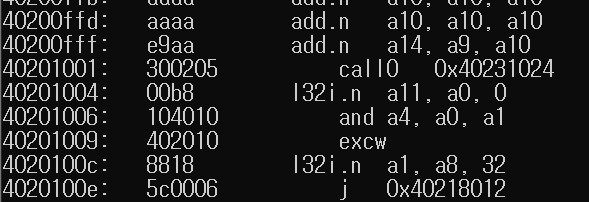
0x40201000 언저리부터 시작
hex로 보자.
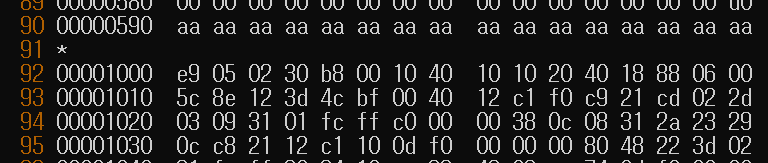
잠깐만.. e9 저거 매직키 아니야?
3. 이미지 헤더 분석
00000000  e9 01 02 30 9c f2 10 40  00 f0 10 40 70 05 00 00  |...0...@...@p...|
00001000  e9 05 02 30 b8 00 10 40  10 10 20 40 18 88 06 00  |...0...@.. @....|
e9 - image header의 magic key
05 - 세그먼트 수
02 - 첫번째 이미지와 동일한 flash mode
30 - flash size와 frequency도 같고
0x401000b8 - 진입점으로 해석해도 이상하지 않은 주소까지
지나치게 자연스럽다.
이게 만약 올바른 이미지 헤더라면
그럼 다음에 오는 10 10 20 40 18 88 06 00 이게 세그먼트 헤더라는 말이다.
0x40201010 - 적재되는 주소
0x00068818 - 세그먼트 크기
충분히 그럴듯하다.
다음 세그먼트도 확인해보자.
세그먼트 크기가 0x00068818이라면 다음 세그먼트 헤더는
0x1000 + 8 + 8 + 0x00068818 = 0x00069828에 있을거다.
00069820 04 80 01 00 00 00 00 00 00 00 10 40 e8 00 00 00 |...........@....|
두번째 세그먼트 헤더를 찾았다.
00 00 10 40 e8 00 00 00 이게 두번째 세그먼트 헤더다.
0x40100000 - 적재 주소
0xe8 - 세그먼트 크기
세번째 세그먼트의 오프셋은 0x69828 + 0x8 + 0xe8인 0x69918이다.
00069910 00 08 31 12 c1 10 0d f0 e8 00 10 40 08 6d 00 00 |..1........@.m..|
e8 00 10 40 08 6d 00 00 이게 세번째 세그먼트 헤더다.
0x401000e8 - 적재 주소
0x6d08 - 세그먼트 크기
네번째 세그먼트의 오프셋 0x69918 + 0x8 + 0x6d08 = 0x70628
00070620 30 20 b1 30 3f 31 0d f0 00 80 fe 3f 68 05 00 00 |0 .0?1.....?h...|
0x3ffe8000 - 적재 주소
0x0568 - 세그먼트 크기
다섯번째 세그먼트 오프셋 0x70628 + 0x8 + 0x0568 = 0x70b98
00070b90 00 c0 00 c0 d0 ea 20 40 70 85 fe 3f 3c 0c 00 00 |...... @p..?<...|
적재 주소 3ffe8570
크기 0xc3c
이게 마지막이다.
혹시 모르니 더 들어가보자.
여섯번째 세그먼트 헤더의 오프셋 0x717dc

저 하얀 부분부터가 여섯번째 헤더라는 말인데 여기부터는 확실히 부자연스럽다.
이미지 헤더에 나온대로 세그먼트 5개가 전부라고 보는게 맞겠다.
추가적인 magic key도 전부 찾아봤지만 이미지 헤더로 보이는 부분은 더 없었다.
드디어 세그먼트를 전부 찾은 것 같다.

알아보니 esp8266이 OTA를 지원하는데
첫번째 이미지는 부트로더고 그 뒤에 순차적으로 이미지들이 오는 구조를 갖는다고 한다.
당연히 여러개의 이미지가 들어간다는 것을 전제했어야 했다.
지금같은 경우엔 부트로더 제외 하나밖에 없으니
지금 찾은 두번째 이미지가 진짜였다는 말이다.
4. 세그먼트 추출
dd if=esp_backup.bin of=image1.bin bs=1 skip=0 count=1408
dd if=esp_backup.bin of=image2.bin bs=1 skip=4096 count=2093056
이미지 헤더 기준으로 펌웨어를 두개로 분리했다.
다시 esptool에 넣어보자.
>python -m esptool image_info image1.bin
esptool.py v4.9.0
File size: 4096 (bytes)
Detected image type: ESP8266
Image version: 1
Entry point: 4010f29c
1 segments

Segment 1: len 0x00570 load 0x4010f000 file_offs 0x00000008 []
Checksum: d0 (valid)
>python -m esptool image_info image2.bin
esptool.py v4.9.0
File size: 2093056 (bytes)
Detected image type: ESP8266
WARNING: Suspicious segment 0x40201010, length 428056
Image version: 1
Entry point: 401000b8
5 segments
Segment 1: len 0x68818 load 0x40201010 file_offs 0x00000008 [IROM]
Segment 2: len 0x000e8 load 0x40100000 file_offs 0x00068828 [IRAM]
Segment 3: len 0x06d08 load 0x401000e8 file_offs 0x00068918 [IRAM]
Segment 4: len 0x00568 load 0x3ffe8000 file_offs 0x0006f628 [DRAM]
Segment 5: len 0x00c3c load 0x3ffe8570 file_offs 0x0006fb98 [DRAM]
Checksum: 78 (valid)
이제 이미지 두개 모두 인식이 된다.
드디어 세그먼트를 전부 찾았다.
엔트로피로 추정했던 코드 영역의 크기와 거의 일치한다.
dd if=image2.bin of=segment1.bin bs=1 skip=$((0x00000008)) count=$((0x0068818))

dd if=image2.bin of=segment2.bin bs=1 skip=$((0x00068828)) count=$((0x00000e8))

dd if=image2.bin of=segment3.bin bs=1 skip=$((0x00068918)) count=$((0x006d08))

dd if=image2.bin of=segment4.bin bs=1 skip=$((0x0006f628)) count=$((0x0000568))

dd if=image2.bin of=segment5.bin bs=1 skip=$((0x0006fb98)) count=$((0x0000c3c))
확인된 오프셋과 크기대로 세그먼트 모두 분리
xtensa-lx106-elf-objdump -D -b binary -m xtensa -EL --start-address=0x4010f000 --adjust-vma=0x4010f000 image1.bin > disasm0.txt

xtensa-lx106-elf-objdump -D -b binary -m xtensa -EL --start-address=0x40201010 --adjust-vma=0x40201010 segment1.bin > disasm1.txt

xtensa-lx106-elf-objdump -D -b binary -m xtensa -EL --start-address=0x40100000 --adjust-vma=0x40100000 segment2.bin > disasm2.txt

xtensa-lx106-elf-objdump -D -b binary -m xtensa -EL --start-address=0x401000e8 --adjust-vma=0x401000e8 segment3.bin > disasm3.txt
툴체인으로 모두 디스어셈블했다.
0번은 1번 세그먼트(부트로더)다.
데이터 영역 두개는 디스어셈블하면 오히려 보기 힘들어진다.
필요할 때 strings나 hexdump로 확인해야겠다.
이렇게 간단한걸.. 진짜 미친 삽질을 했다.
드디어 모든 세그먼트를 확보했다.
'RSW-725R > 분석 자료 (공개용)' 카테고리의 다른 글
| 7. 후킹1 - 펌웨어 변조 (0) | 2026.04.22 |
|---|---|
| 6. 복호화 로직 분석 (0) | 2026.04.22 |
| 4. 펌웨어 디스어셈블 (0) | 2026.04.22 |
| 3. 동적 분석 (0) | 2026.04.22 |
| 2. UART 연결 및 펌웨어 추출 (0) | 2026.04.22 |


